Every purchase, voucher redemption and signup in a Kademi account is scored against a set of fraud rules. This is the reference for what it does, what an administrator can change, and how it connects to intrusion detection and to the Copilot agents.
Contents
- What it does
- Where to find it
- How scoring works
- The eleven rules
- Tuning a rule
- Thresholds and blocking
- Reading fraud events
- Turning blocking on
- Escalating through IDP
- Investigating with Copilot
- Roles and permissions
- What it does not do
- Words to use
What it does
Three kinds of operation are scored for fraud risk, every time they happen, in every Kademi account.
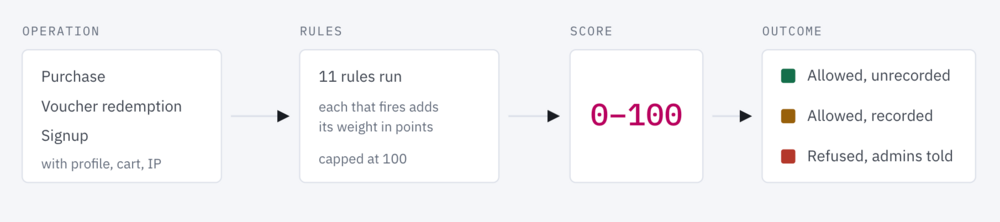
When someone places an order, redeems a voucher or registers on a site, Kademi runs a set of rules against that operation before it completes. Each rule that fires adds points to a risk score out of 100. Two thresholds turn that score into a decision: record it for review, or refuse it outright.
The three scored operations are purchases (including points redemptions through the store), voucher redemptions, and signups. Nothing else is scored.
Fraud prevention is not an app, and there is nothing to install or switch on. It ships inside admin-lib, so every account has it, with all eleven rules already running. What a new account does not have is blocking — it records and reports from day one, and refuses nothing until an administrator deliberately turns blocking on.
Where to find it
Two pages in the admin console, under the Website Manager menu.
- Fraud Prevention
- The rules, their weights and settings, and the account's thresholds. Path
/fraud/rules/.
- Fraud Events
- Every operation that scored at or above the recording threshold, newest first, with the rules that fired and what each one saw. Path
/fraud/events/.
- Intrusion Detection
- Not a fraud page, but where an account configures what should happen beyond Kademi's own response — blocking an address, blocking a profile. Path
/manage-idp/. See Escalating through IDP.
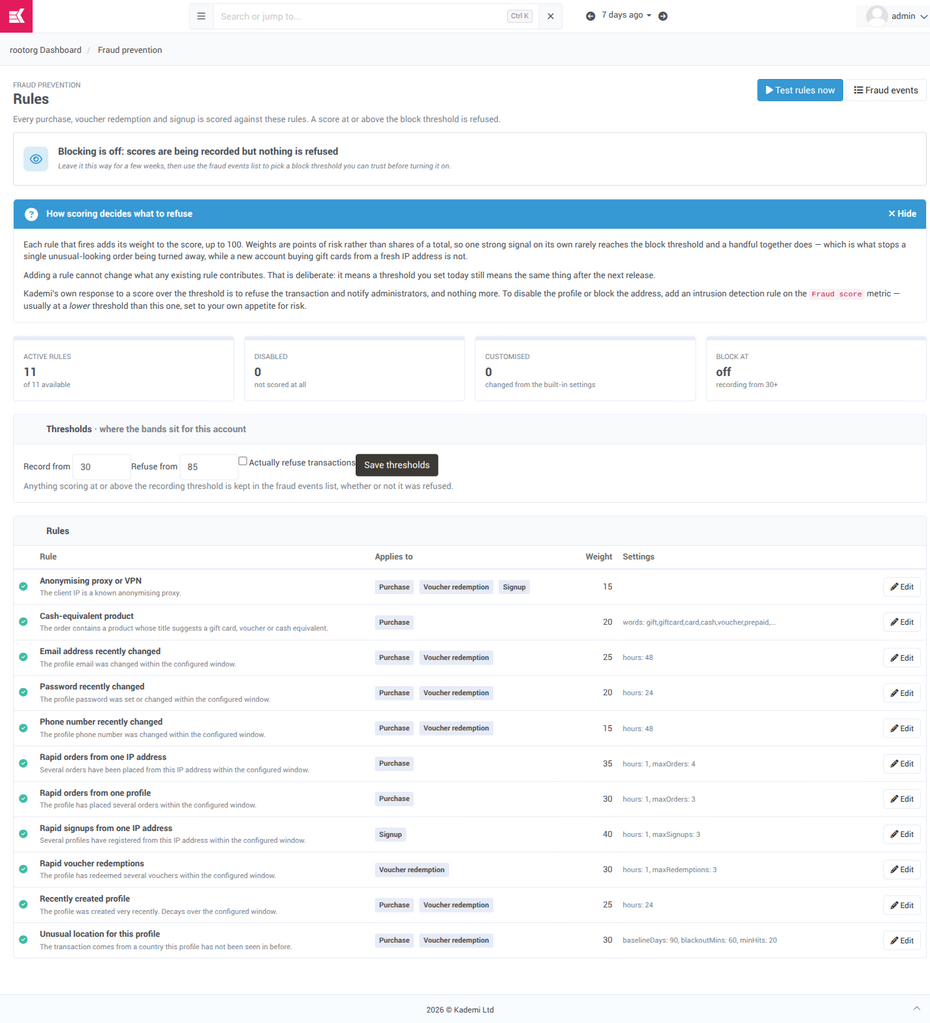
Fraud Prevention. The whole configuration surface on one page: the blocking state at the top, four summary tiles, the two thresholds, and every rule with its weight and settings. The blue panel can be dismissed and stays dismissed.
How scoring works
Points are added, not averaged. That is the design decision everything else follows from.
Each rule has a weight, which is the number of risk points it contributes when it fires as hard as it can. Some rules fire partially — the recently-created-profile rule decays over its window, so a profile made ten minutes ago scores nearly its full weight and one made twenty hours ago scores a fraction of it. The score is the sum of every rule's contribution, capped at 100.
Adding points rather than averaging them means a threshold you set today still means the same thing after the next release. If the score were an average, adding a twelfth rule would dilute every existing signal and silently move the goalposts. It also means a single rule rarely reaches the block threshold on its own — which is the point. Several weak signals agreeing is stronger evidence than any one of them, and it is what stops one unusual-looking order being turned away while a new account buying gift cards from a fresh IP address is not.
The three bands
|
CLEAR below the recording threshold Nothing happens. The operation completes and nothing is written down. The overwhelming majority of operations. |
WATCH recording threshold · default 30 The operation completes normally — the customer sees no difference — and a fraud event is recorded for someone to look at. |
BLOCK block threshold · default 85 The operation is refused and administrators are notified. Only if blocking has been switched on; otherwise it is recorded like a watch. |
A blocked operation is still recorded, which is why the block threshold can never be set below the recording threshold — the page will refuse the change rather than let blocked operations go unlogged.
When a rule breaks
If a rule throws an error or runs too long, it contributes nothing and is recorded as failed on the event. It is excluded rather than scored as zero, so a broken rule cannot quietly depress scores and become a silent bypass. A broken rule never blocks a transaction by itself.
The eleven rules
All shipped enabled. The weights below are the defaults an account starts with.
| Rule | What it looks for | Applies to | Weight | Settings |
|---|---|---|---|---|
| signup-velocity-ip | Several profiles registering from one IP address in a short window. | Signup | 40 | hours 1 maxSignups 3 |
| order-velocity-ip | Several orders placed from one IP address in a short window. | Purchase | 35 | hours 1 maxOrders 4 |
| order-velocity-profile | One profile placing several orders in a short window. | Purchase | 30 | hours 1 maxOrders 3 |
| redemption-velocity-profile | One profile redeeming several vouchers in a short window. | Voucher redemption | 30 | hours 1 maxRedemptions 3 |
| unusual-location | The operation comes from a country this profile has never been seen in. Reads the profile's own browsing history to learn what is normal, ignoring the last hour so the current session cannot teach the baseline that it belongs. | PurchaseVoucher redemption | 30 | baselineDays 90 blackoutMins 60 minHits 20 |
| new-profile | The profile was created very recently. Decays across the window rather than switching off at the end of it. | PurchaseVoucher redemption | 25 | hours 24 |
| email-changed | The profile's email address was changed within the window. Changing the email redirects the password reset, which is the classic account-takeover move. | PurchaseVoucher redemption | 25 | hours 48 |
| password-changed | The profile's password was set or changed within the window. | PurchaseVoucher redemption | 20 | hours 24 |
| high-risk-product | The order contains a product whose title suggests a gift card, voucher or cash equivalent — the things worth stealing an account for, because they resell. | Purchase | 20 | words gift, giftcard, card, cash, voucher, prepaid, e-gift |
| phone-changed | The profile's phone number was changed within the window. | PurchaseVoucher redemption | 15 | hours 48 |
| anonymous-proxy | The address is a known anonymising proxy or VPN. | PurchaseVoucher redemptionSignup | 15 | — |
At signup there is no profile yet, so nothing that reads a profile's history can apply — not the creation date, not the email or password changes, not the location baseline. Signups are scored on address velocity and anonymising proxy only, and those two rules correctly leave Signup out of the others. This is a limit of the moment being scored, not a gap in the rule set.
Other apps can contribute rules of their own. A rule that belongs to an app the account no longer has is shown as not runnable and scores nothing — worth knowing before reporting an account as quiet.
Tuning a rule
SET BY THE ACCOUNT
An account can retune and disable the rules it was given. It cannot rewrite what they look at.
Edit on any row opens the rule. Four things can be changed: whether it runs, its weight, its settings, and its wording. The edit panel shows the current block threshold next to the weight field, because a weight is only meaningful relative to the threshold it is trying to reach.
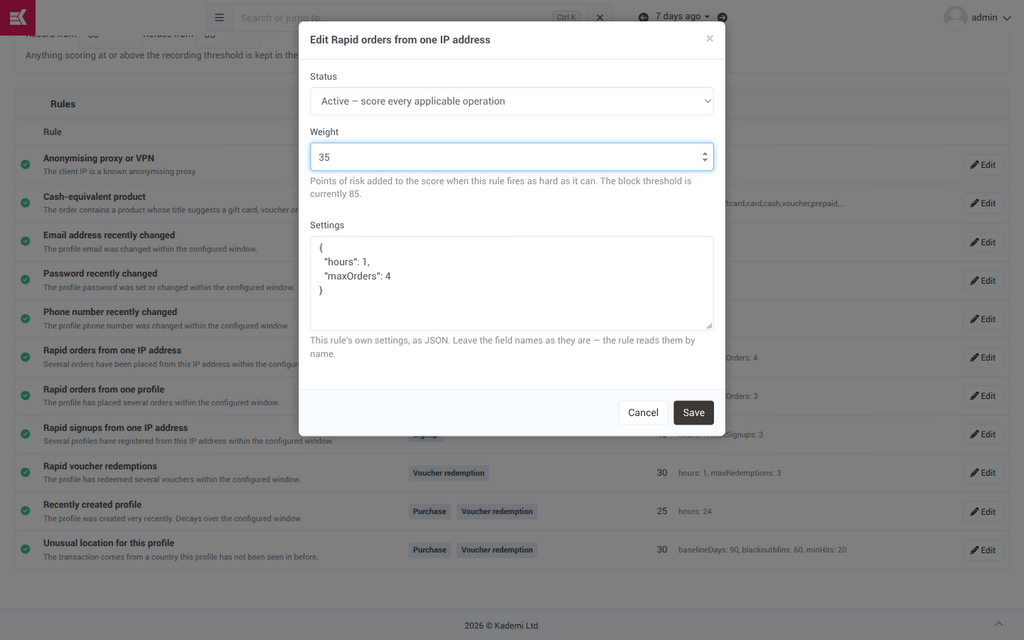
Editing a rule. Status, weight and the rule's own settings as JSON. The field names are read by name, so they are the one thing not to change.
What cannot be changed
A rule's logic and the operations it applies to are code, and are not editable from the admin. This is deliberate: it means an account that has retuned one weight still picks up later improvements to that rule's query and description, because an account's change is stored as a difference from the shipped rule rather than a copy of it.
The three kinds of rule
| System | Shipped by Kademi or by an installed app, exactly as provided. Most rules, most of the time. |
| Override | A shipped rule this account has retuned. Only the changed fields are stored. Reset discards them and restores the shipped settings. |
| Custom | A rule that exists only in this account. Reset deletes it. Custom rules cannot yet be authored through the admin — see What it does not do. |
The Customised tile on the rules page counts overrides and custom rules together — it answers "how far has this account drifted from what we ship?" at a glance.
Test rules now
Runs every rule against your own profile in the purchase context and shows what each one returned, without recording anything or affecting any customer. It is a check that the rules are wired up and running, not a simulation of a real transaction — with no cart behind it, the product and order rules have nothing to look at and correctly return zero.
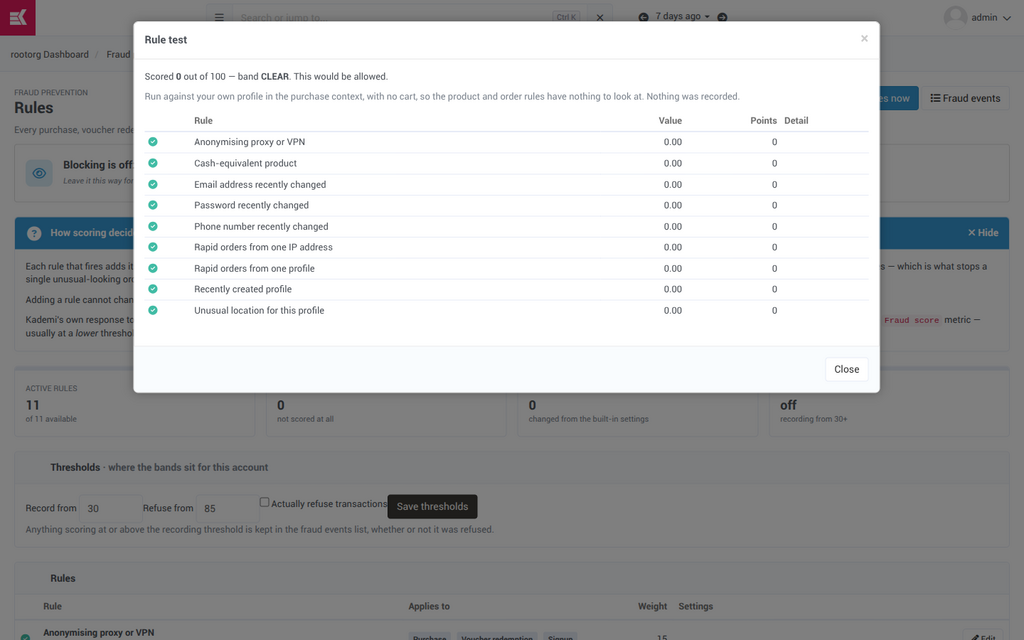
Test rules now. The dialog says in its own words what it ran against and that nothing was recorded.
Thresholds and blocking
SET BY THE ACCOUNT
- Two numbers and a checkbox, on the rules page. The checkbox is the one that matters.
-
Record from - At or above this score the operation is written to the fraud events list. Default 30. Below it nothing is kept, so this number decides how much evidence the account accumulates.
Refuse from At or above this score the operation is refused. Default 85, deliberately high — a score that only very likely fraud reaches. Cannot be set below the recording threshold. Actually refuse transactions Whether refusing really happens. Off by default. With it off, high-scoring operations are recorded and allowed through.
An account can have carefully tuned rules, a wall of high-scoring events, and be stopping precisely nothing — because blocking is off. That is the correct state for a new account, and the wrong state to stay in forever. The rules page says so in a banner rather than making anyone infer it, and the fraud events page shows Refused as its own tile so the number is impossible to miss.
Turning blocking on starts refusing real customers immediately, they get no explanation, and nobody reports it — the people affected simply do not come back. The sequence under Turning blocking on exists so that decision is made against evidence.
Reading fraud events
The only honest evidence about whether the tuning is right.
Every operation that reached the recording threshold is listed newest first, with four tiles above it: how many were recorded, how many refused, how many allowed through, and the highest score seen. Each row shows when, the score, the operation, the profile, the address, and — in the Why column — every rule that fired with the points it added and what it actually saw.
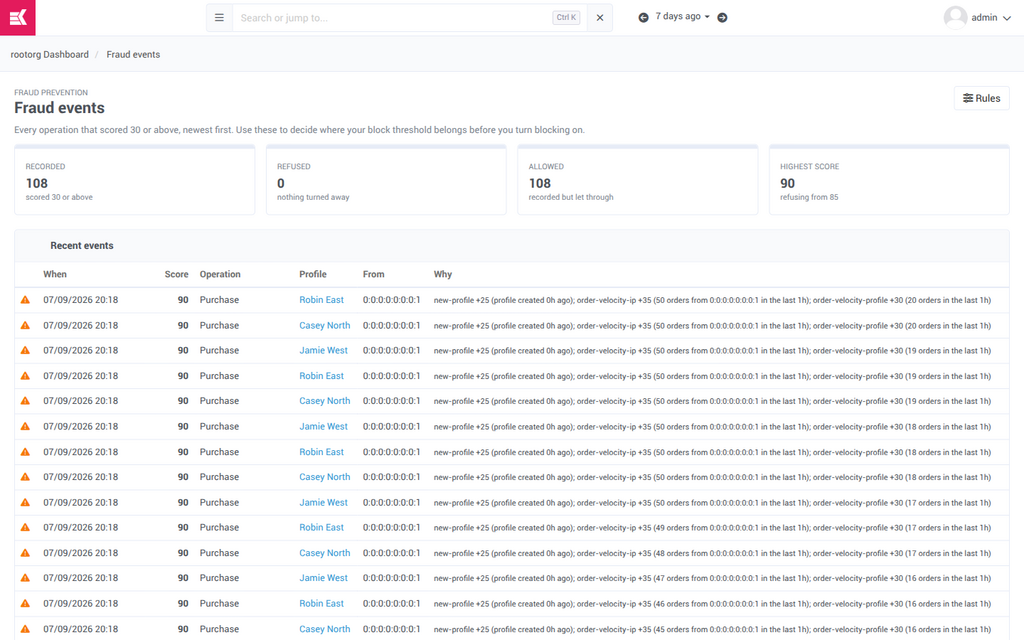
Fraud events. The Why column is the part to read — order-velocity-ip +35 (50 orders from 0:0:0:0:0:0:0:1 in the last 1h) is the rule, the points and the evidence in one line. Here 108 operations scored 90 against a block threshold of 85, and every one was allowed through, because blocking is off.
What the patterns mean
- High-scoring events that were not refused. Either blocking is off, or the block threshold is above what real abuse actually scores. Both look like a working system from the rules page.
- One rule in almost every event. Either it has found the account's real problem, or it fires on ordinary behaviour and is inflating every score. Read what it saw in a few events before deciding. Do not raise the threshold to compensate for one noisy rule — that raises it for every other rule too.
- Repeated events for one profile or address. A pattern for one actor is a very different finding from the same total spread across many people, and it is the one to act on directly rather than by retuning.
- Nothing at all. Either the account has no abuse, or the recording threshold is above what anything reaches, or the operations that would be scored are not happening. Check how many rules are enabled and runnable before calling an account clean.
Turning blocking on
This is a real sequence, and the order is the whole point: the block threshold is calibrated against the account's own traffic before it is allowed to refuse anyone.
-
Leave it recording
A new account is already scoring every operation with all eleven rules. Leave blocking off and let events accumulate — a few weeks of real traffic, including at least one busy period.
-
Read what scored highest
Sort through the fraud events at and above the score you are considering as a block threshold. For each one, ask the only question that matters: would I have wanted this customer refused?
-
Retune what is obviously wrong
If one rule is in nearly every event and its evidence looks like ordinary behaviour, change that rule rather than the threshold. For a velocity rule producing false positives, lengthen the window before raising the count — a family sharing a connection and an office behind one address both look like velocity.
-
Set the block threshold where the evidence puts it
Not at the default because it is the default. At the score above which the recent events were all things you would refuse.
-
Turn blocking on, and watch the Refused tile
From here the Refused count on the fraud events page is the number to watch. It should be small and it should be right.
-
Decide separately whether to escalate
Refusing the transaction is as far as Kademi goes. Blocking the address or disabling the profile is a separate decision, configured in intrusion detection — see below.
Escalating through IDP
SET BY THE ACCOUNT, IN INTRUSION DETECTION
How an account goes beyond refusing the transaction — to blocking the address and blocking the profile.
Kademi's own response to a high fraud score is to refuse the operation and notify administrators, and nothing more. It does not disable the profile and does not block the address. That is a deliberate limit: those are heavier actions with real consequences for a legitimate customer, and the decision belongs to the account.
Fraud and intrusion detection are joined by a single one-way seam. Fraud announces a score and knows nothing about who is listening; intrusion detection remembers that score against the profile and the address, and exposes it as a metric its own rules can act on — using the blocking actions it already has. Fraud grows no blocking powers of its own, and IDP needs no knowledge that fraud exists.
Two thresholds, on purpose
| Set by | Typical level | What happens | |
|---|---|---|---|
| Kademi block | The account, on the fraud rules page | High — very likely fraud | Refuse the transaction, notify administrators |
| Escalation | The account, in Intrusion Detection | Usually lower, set to the account's appetite for risk | Block the address, block the profile, notify — whatever the account chooses |
The escalation threshold is usually the lower of the two, because the actions are reversible in a way a refused order is not — an address blocked for a day can be unblocked, while a customer turned away at checkout is simply gone. This is also why the score is normalised to 0–100: an escalation threshold is meaningless if adding a rule silently changes what a given number means.
Step one · define the metric
On Intrusion Detection → Metrics, add a metric and choose Fraud score. It takes a window, what to key on — the logged-in user, the client address, or the whole account — and whether to report the highest score in the window or how many scored events there were.
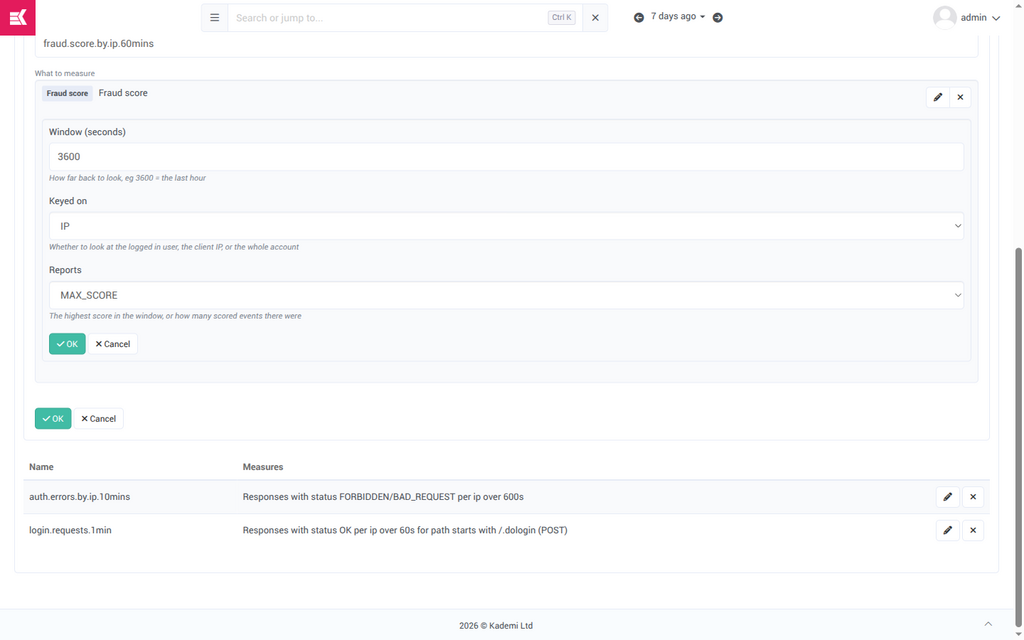
A fraud score metric. Named fraud.score.by.ip.60mins: the highest fraud score seen from one address in the last hour. The name is how rules refer to it, so it is worth making it describe itself.
Step two · write the rule that acts on it
On the Rules tab, add a rule whose condition compares that metric against a number, and give it the actions to take. Add IP to known list adds the address to the blacklist, Temporarily block writes a timed access block, and Notify administrators raises it with a person.
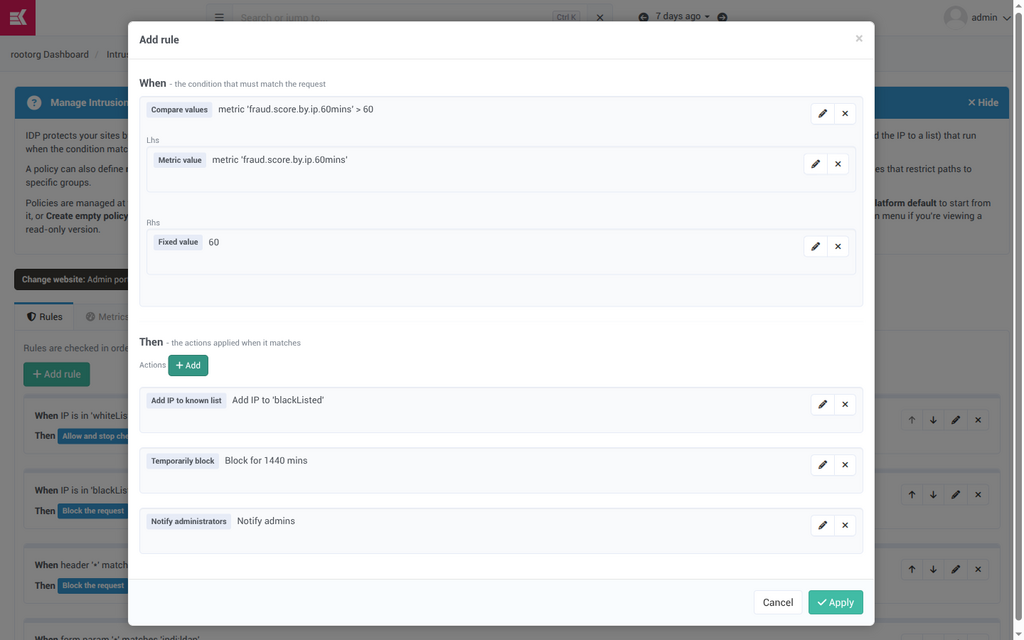
The escalation rule. Above a fraud score of 60 from one address in an hour — well below Kademi's own block threshold of 85 — blacklist the address, block it for a day, and tell an administrator.
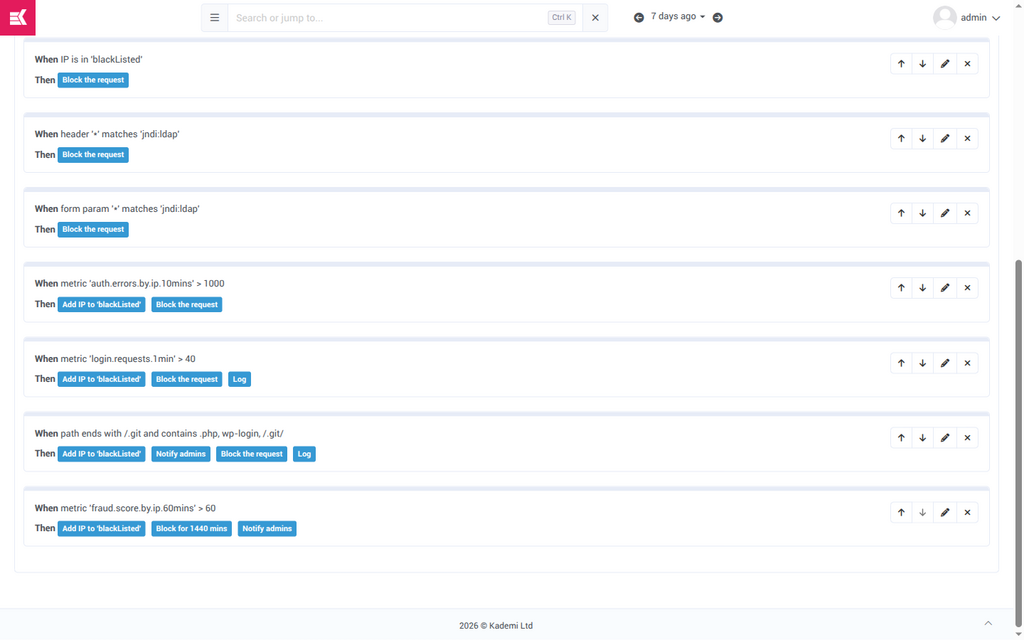
In the rule list. The fraud rule sits alongside the platform's shipped protections and is read in order like any other. Rules are saved as you build them; there is no separate save step.
Blocking a profile via Temporarily block is timed, not permanent, and a blacklisted address can be removed from the list on the Known IPs tab. Nothing in this path is irreversible, which is exactly why it is the right place for a lower threshold than the one that refuses transactions.
Investigating with Copilot
The tuning problem — reading events and deciding what they mean — is exactly the sort of reading nobody gets around to. It is given to an agent.
Kademi's Account Security specialist can read and tune fraud prevention from the Copilot sidebar, anywhere in the admin. Ask it about fraud in your own words and it investigates: reads the events, reads the rules, breaks the pattern down by profile and address, and reports what it found and what it could not check.
What it can do
| Tool | What it does | |
|---|---|---|
| listFraudEvents | The recent events, filterable to one profile, one address, or only refused operations. | Reads |
| listFraudRules | Every rule with its weight, settings, whether it runs, whether it is runnable, and whether this account has changed it. Plus the thresholds. | Reads |
| updateFraudRule | Retune a rule — enable, disable, change its weight or settings. | Changes |
| resetFraudRule | Discard this account's changes and restore the shipped rule. | Changes |
| setFraudThresholds | Move the recording or block threshold, or turn blocking on or off. | Changes, confirmed |
The specialist also carries a reference document on fraud tuning that it reads when the subject comes up — the judgement that is not in any tool description. Two things it is told, which show up in how it answers: read the events before touching anything, and turning blocking on is the administrator's decision, not yours. It will propose enabling blocking and say what it would have refused; it will not decide.
What an investigation looks like
Asked to investigate the account shown throughout this document, the specialist read the events and the rules, then drilled into the individual profiles it found:
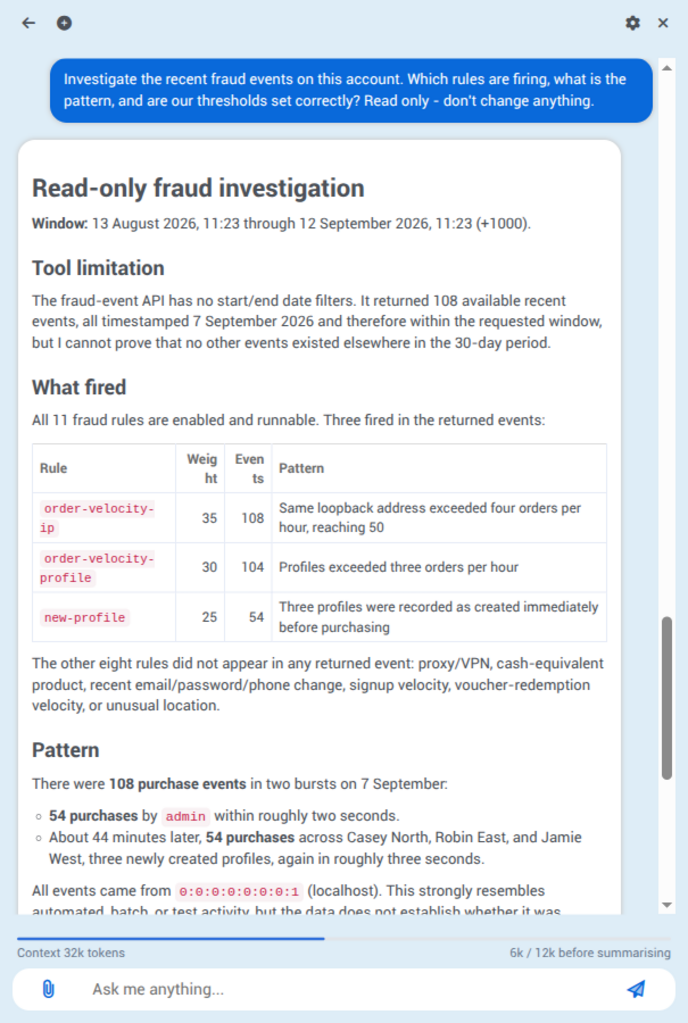
What fired. Three of the eleven rules account for every event. It names the eight that did not fire, which is a finding in itself.
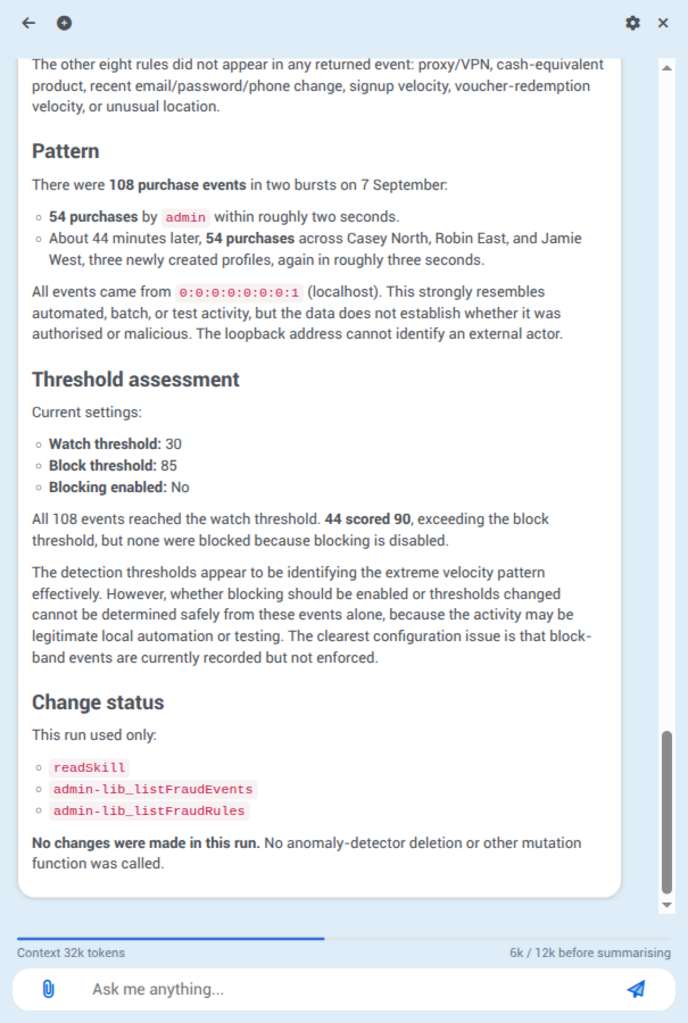
The finding. 44 operations scored above the block threshold and none were refused — the clearest configuration issue in the account. It says what it cannot conclude too: a loopback address cannot identify an external actor, so it will not call automated activity malicious.
Note what it does at the end: it lists the tools it used and states that nothing was changed. Asked to investigate, it investigated.
Why fraud and account security are the same specialist
Fraud scoring is about the operation; the specialist's other tools — login history, the audit trail, web traffic, orders, memberships — are about the person. The overlap is where the strong findings are. Fraud events for rapid orders, plus a login from a new country, plus an email change the day before, is an account takeover being cashed out, and no one of those three is worth acting on alone. Fraud events also carry the address, which is a lead the login history can follow: the same address across unrelated profiles is one of the strongest signals available in a Kademi account.
Roles and permissions
Two roles, granted at the organisation level.
-
FraudViewer Can open both pages and read everything — the rules, the thresholds, the events and who was refused. Cannot change anything. FraudManager - Everything FraudViewer can do, plus retuning rules, resetting them, and moving the thresholds. Can be granted on its own; it does not require FraudViewer as well.
Administrator - Reaches everything regardless, so an account that has granted neither role to anyone is not locked out of its own fraud settings.
The split is deliberate: being able to see which rules are in force is not the same as being allowed to move the threshold that refuses customers. Both roles apply at organisation level only — there is no website-scoped grant, because the rules and thresholds are account-wide.
What it does not do
Known limits of this version. Worth writing down so support answers do not have to guess.
- No challenge and no review queue. An operation is allowed or refused. There is no step-up verification, and no queue of held transactions for a human to approve.
- Rules cannot be written in the admin. An account can retune, disable and reset the rules it was given. A genuinely new rule needs an app to provide it.
- Refused customers get no explanation, and no self-service path. A refused order simply fails. Whoever handles support needs the fraud events page to find out why.
- Admin notification on a block is not wired up yet. The decision, the recorded event and the IDP signal are all in place; the notification to administrators on the block band is outstanding. Until it lands, an account learns about refusals from the events page, not from an alert. Escalation rules configured in IDP can notify.
- Fraud events cannot be filtered by date. The list is newest-first with a row limit. An agent asked about a 30-day window will say it cannot prove the returned events cover exactly that period — which it should, rather than implying it checked.
- Voucher redemption velocity counts vouchers, not redemptions. Right for a voucher redeemed once; an undercount for one redeemed repeatedly.
- Nothing is scored retrospectively. An operation is scored as it happens. Turning a rule on does not re-score history, and the events list only ever grows forward from when scoring started.
Words to use
The admin pages use customer-facing language rather than the internal names. Matching them keeps the documentation and the product saying the same thing.
| In the product | Internally | Note |
|---|---|---|
| Record from | watchScore | Say "the recording threshold", not "the watch score". |
| Refuse from | blockScore | "The block threshold" is fine; it is what the page calls it in prose. |
| Actually refuse transactions | blockEnabled | "Blocking is on / off". |
| Refused | blocked | Prefer refused for the transaction and blocked for an address or a profile, so the two are never confused. |
| Fraud event | FraudEvent | A recorded operation, not an incident. One customer's single order is a fraud event. |
| Applies to | contexts | Purchase, Voucher redemption, Signup. |
| Weight | weight | "Points of risk it adds", never "importance" or "score" — the score is the total. |
| Settings | params | Always plural, always the rule's own. |
Three sentences worth reusing
- "Every purchase, voucher redemption and signup is scored against these rules."
- "Each rule that fires adds its weight to the score, up to 100."
- "Kademi refuses the transaction and notifies administrators. Blocking the address or the profile is configured separately, in intrusion detection."