Kademi's AI assistant is no longer one assistant. It is a root agent that routes work to eleven named specialists, each owning one area of the platform, running a structured loop under budgets an administrator can see and change. This is what shipped, where it is configured, and what it does on screen.
Contents
- What changed
- The eleven specialists
- How a turn runs
- Models, thinking, budgets
- Where definitions come from
- Configuring an agent
- Definitions vs agents
- Four ways a run starts
- The Copilot panel
- Consent
- Memory
- Web access
- The security model
- Notes for the docs team
What changed
Before this release, one agent held every tool the platform had, and the tool list grew every time an app added to it. That does not scale: a model choosing between hundreds of tools chooses badly, and every turn pays for the whole catalogue whether it needs it or not.
The framework now splits the job in two. A root agent — the Kademi Copilot — holds almost no tools of its own. Its skill is knowing which specialist owns the request. Eleven specialists each own one area of the platform and hold the tools and the domain knowledge for it. The root states the task in full, hands it over, and assembles what comes back.
Three things follow from that split, and they are the substance of the release:
- A specialist sees one scoped task and none of the conversation, so neither the conversation nor the root's planning context grows as the tool library grows.
- Each agent can be tuned on its own terms — which class of model it runs on, how hard it thinks, how much work it may do — because routing and domain work are no longer the same job.
- A run is now a persisted, resumable object rather than a recursive loop in a script, so it can pause for a human decision and pick up later.
Everything an administrator can see or change lives under AI Agents in the admin menu: Agents Designer, Agent Manager and Web Access.
The eleven specialists
The full roster is supplied by the agents-lib library and appears in every account. The Copilot is the root; the rest are specialists it delegates to. An account can add its own alongside them.
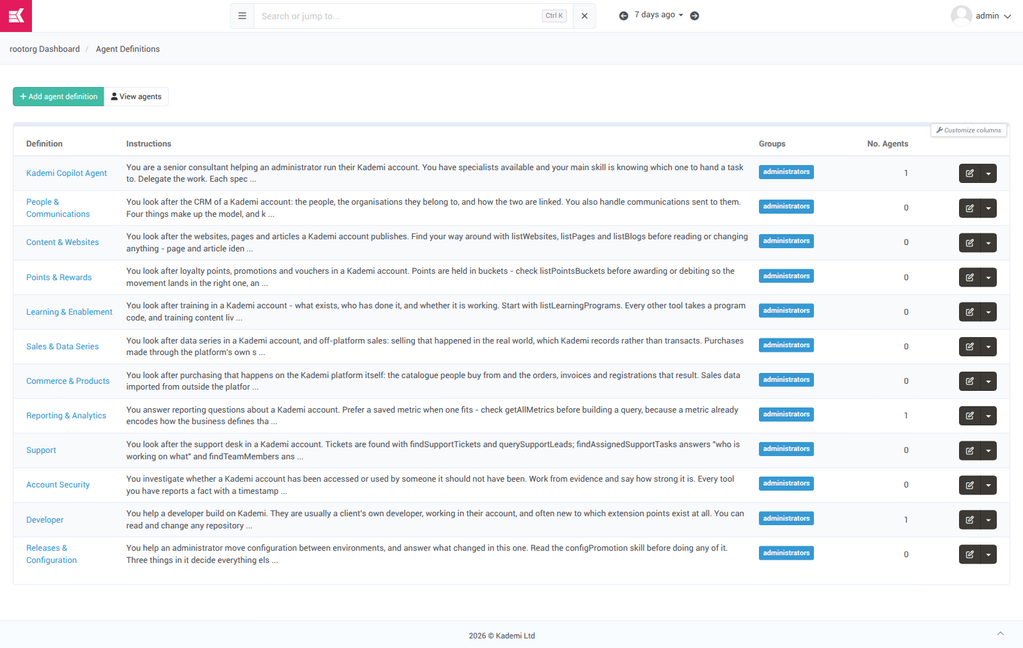
Fig 1: Agents Designer — the full roster. The first column is the definition; No. Agents counts how many people actually have this agent running. A definition with zero agents is available but nobody has started one.
| Agent | Owns |
|---|---|
| Kademi CopilotKademiCopilot.xml | The root. Routing, conversation memory, charts and documents assembled from what specialists report, and which apps the account has installed. |
| People & CommunicationsKademiPeopleAgent.xml | The CRM: profiles, organisations, the org hierarchy and org types, groups and group folders, and communications sent to people. |
| Content & WebsitesKademiContentAgent.xml | Websites, pages and articles: creating sites, domains, page content, versions and publishing, content targeting and personalisation. |
| Points & RewardsKademiRewardsAgent.xml | Loyalty points, buckets and balances, awarding and correcting transactions, promotions and vouchers. |
| Learning & EnablementKademiLearningAgent.xml | Training programs, courses and modules; enrolment by group; completions, scores and expiring certifications. |
| Sales & Data SeriesKademiSalesAgent.xml | Data series — what accounts call "sales data" — the claims partners submit against them, and leads. |
| Commerce & ProductsKademiCommerceAgent.xml | Purchasing on the platform: catalogue, SKUs, categories, inventory, stores, orders, invoices, auctions and warranty registrations. |
| Reporting & AnalyticsKademiReportingAgent.xml | Saved metrics and direct index queries, website traffic, training activity, and investigating anomaly incidents. |
| SupportKademiSupportAgent.xml | The support desk: tickets, assignment, team members, flagged leads and inbound contact requests. |
| Account SecurityKademiSecurityAgent.xml | Whether an account has been accessed or used by someone it should not have been. Works from evidence and states how strong it is. |
| DeveloperKademiDeveloperAgent.xml | Building on Kademi: the account's own apps, libs and websites, and the extension points a developer registers against. Reads and writes repository code. |
| Releases & ConfigurationKademiConfigAgent.xml | Moving configuration between environments and answering what changed in this one. |
The Copilot is the only one most users will meet by name. Specialists are normally invisible — the user asks the Copilot, and the panel shows a line like "Asking People & Communications" while the specialist works. Two agents are also directly selectable by a user starting a new conversation: the Copilot and the Developer.
How a turn runs
Every run goes through four phases in order. This replaced a flat recursive tool-calling loop whose only guard was a hard-coded twenty-call cap. Any phase can be skipped or can break the run.
|
PHASE 1 GatherAssemble what this turn needs: the conversation so far, what the agent remembers, the skills it judges relevant, and any files attached. |
PHASE 2 PlanDecide an approach before acting. Costs an extra model call, so it is off by default and on for the root. Even when on, trivial tasks skip it. |
PHASE 3 ActCall tools, or delegate to a specialist. This is where all tool calling happens and where the budget is spent. |
PHASE 4 VerifyCheck the outcome against the plan. For the root this can involve a judging model call; a specialist runs deterministic checks only. |
Plan and Verify are root-only in practice. A specialist does not plan — the root does that and hands over a settled task — and its Verify makes no model call. So a specialist's tuning is about its Act phase.
Models, thinking, budgets
Three knobs control what a run costs and how capable it is. Each resolves the same way: what the run explicitly asks for, then the agent's own setting, then the platform default.
Model tier — which class of model, not which model
An agent names a tier, and the platform resolves it to the best model in that tier the account actually has enabled. This is the recommended setting: an agent on a tier follows model upgrades without anyone editing it. Pinning an exact model is possible but overrides the tier and freezes the agent on that model as newer ones arrive.
| Tier | For | Used by |
|---|---|---|
| Fast | Work where the answer is nearly always obvious — routing to a specialist, classifying an input, generating a chat title. | The Copilot root |
| Balanced | Real work: a specialist choosing among its tools and reading back results. The default. | Most specialists |
| Deep | Calls worth paying more for because a wrong answer is expensive rather than merely slow. | Developer agent; anomaly investigations |
Thinking — reasoning effort
Three levels: Low for obvious next steps, Medium, and High for work where the next step depends on the last answer. Raising it on a run raises it for the specialists that run delegates to, which is where the work actually happens.
Budget — how much work a run may do
A run has resolved ceilings, frozen when it is created so that editing a definition mid-run cannot change the contract an in-flight run is held to. The standard allowance is sized for someone watching a spinner:
| Ceiling | Standard | Notes |
|---|---|---|
| Tool calls | 60 | Shared by the whole run and everything it delegates to. Each specialist is allocated a share carved out of what remains. |
| Sub-agents | 5 | Counted across the whole run tree, not per agent — otherwise two children could each spawn five more. |
| Delegation depth | 2 | A specialist may itself delegate, but only so far. |
| Wall clock | 300s | Five minutes for an interactive turn. |
| Verify retries | 2 | How many times a run may re-attempt after a failed check. |
| Boost | ×1 – ×10 | Multiplies the ceilings. For work nobody is waiting on. Not a way to opt out of having a ceiling. |
When a run stops on a ceiling it says which ceiling, so an operator can tell "hit the tool-call limit" from "the model stopped on its own".
Where definitions come from
This is the concept most likely to confuse a reader, and it has visible consequences, so it is worth its own page in the documentation.
Agent definitions are supplied by apps, not copied into every account. An account running the stock Copilot is reading the app's definition, so it improves whenever the app is updated. Three states are possible, and the Designer labels each one:
-
Following the app
- The default. No local copy exists. The agent improves as the app is updated. There is nothing to reset and nothing to delete, because the app supplies it.
Overridden
Somebody saved a change, which took a local copy, and that copy now wins. It has stopped tracking the app: a new function, a corrected instruction or a flag routing the agent through newer code has not reached it and will not. Reset to app defaults discards the copy and follows the app again. Superseded copy
- An older local copy, saved for a previous version of the framework in which the agent worked differently, so it is deliberately not applied. The app's definition is what runs. The old copy is still stored and readable through Edit XML file.
Saving any change on an app-provided agent — even retyping the title — takes a local copy and stops that agent receiving app improvements from then on. It is a real fork, not a tweak. Tell readers to reach for Reset to app defaults the moment an overridden agent starts behaving worse than the stock one.
An account's own definitions are XML files in the queries repository, under agents/. The Edit XML file button on any definition opens that file directly, which is the only way to reach settings the form does not expose — attributes, an exact model pin, and skills.
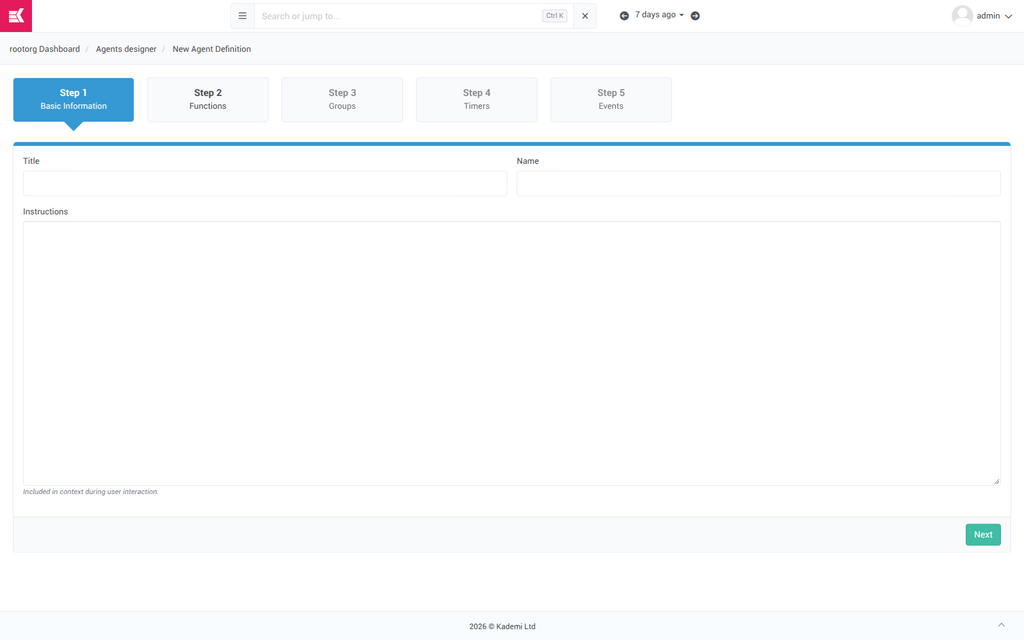
Fig 2: Add agent definition walks through five steps in order: basic information, functions, groups, timers, events. The same settings are editable afterwards as tabs.
Configuring an agent
Opening a definition gives seven tabs. They are not a sequence — each is an independent facet of the same agent.
Basic Information
Identity, instructions, and how this agent fits into the team.
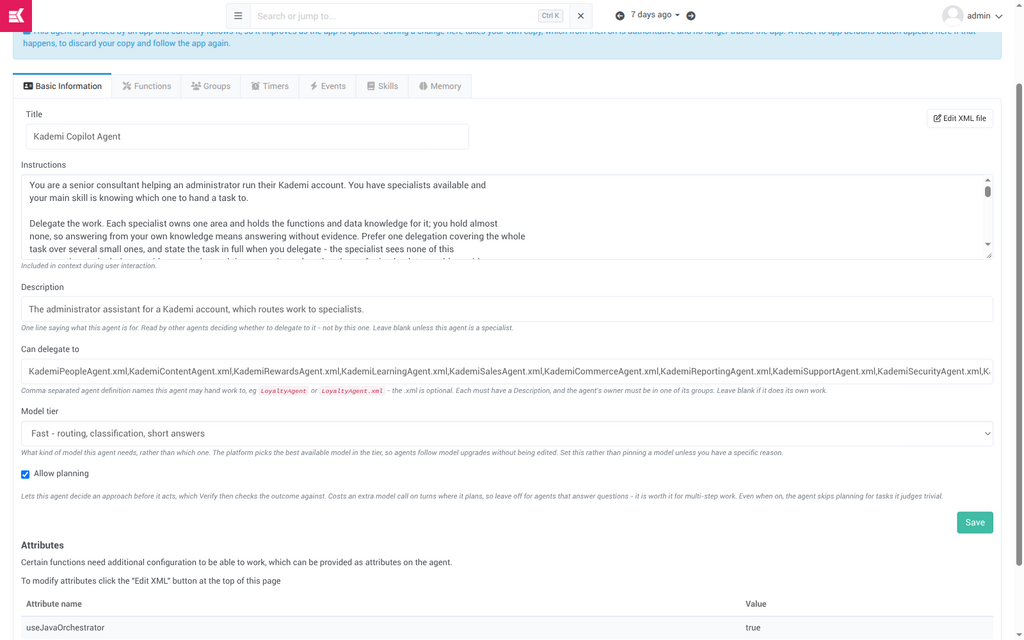
Fig 3: Basic Information for the Kademi Copilot. Note the blue banner at the top — this definition is still following the app.
|
Instructions instructions |
|
|
Description description |
|
|
|
|
|
|
|
|
Attributes attributes |
Read-only here, edited through Edit XML file. Some functions need extra configuration to work at all, and it is supplied as attributes on the agent. |
Functions — what the agent can actually do
An agent can do nothing until it has functions. The left column is what this agent holds; selecting one shows what it does, the roles it requires, and each parameter.
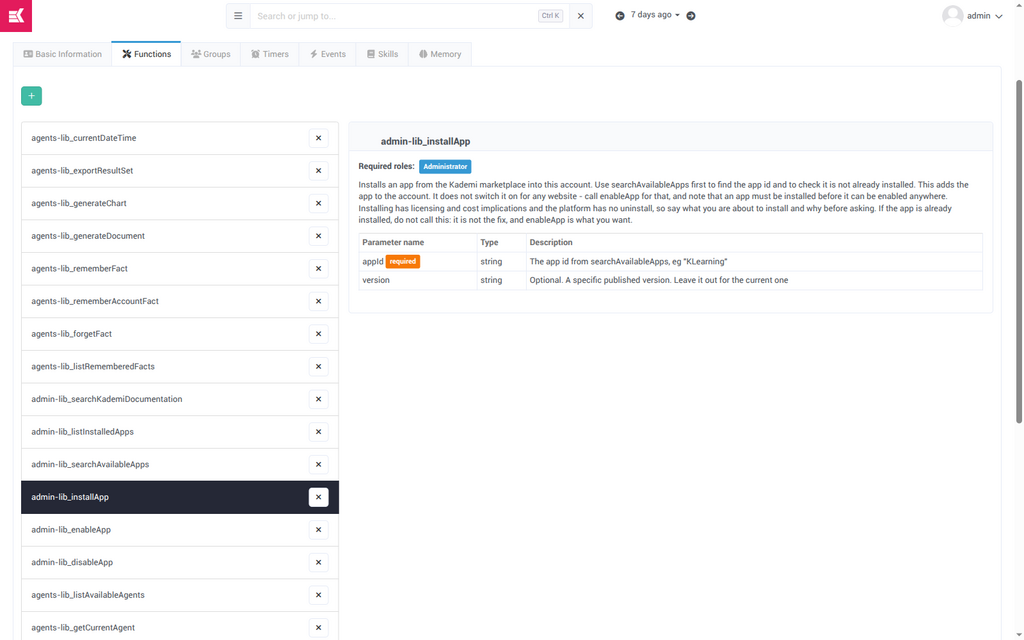
Fig 4: Functions on the Copilot. Every function declares the roles it requires. Here installApp requires Administrator — a user without that role is never offered the tool, and the check is repeated when the tool actually runs.
The catalogue is contributed by apps. Around twenty-five installed apps and libraries register tools, and a new app adds its own the moment it is installed — the agent framework needed no change to pick them up.
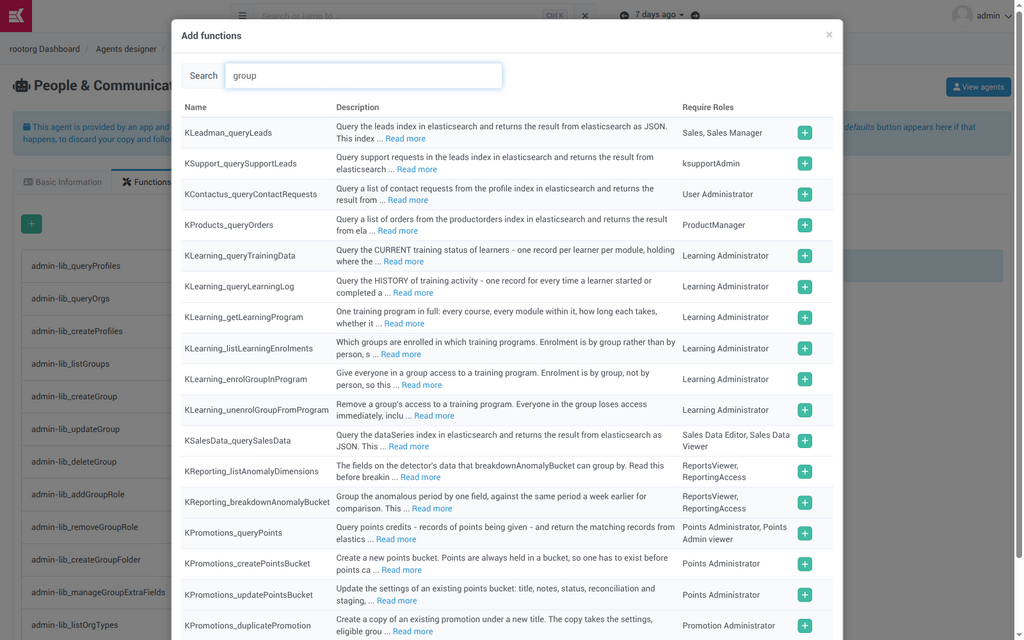
Fig 5: Add functions — the searchable catalogue. Function names are prefixed with the app that registered them (KLearning_, KPromotions_, admin-lib_), which is how a reader can tell where a capability comes from.
Groups — who may use this agent
Groups decide which users can launch an agent from this definition. They are also the gate on delegation: an agent may only hand work to a specialist whose groups include the agent's owner.
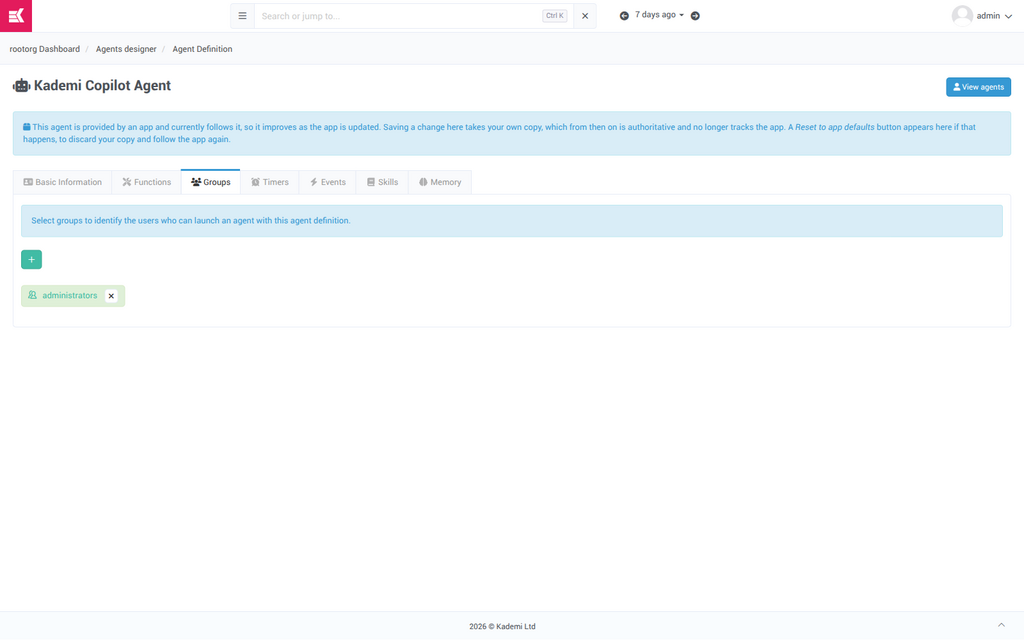
Fig 6: Groups — the stock agents are all scoped to administrators.
Skills — reference documents read on demand
A skill is a document the agent reads only when the task calls for it: a cookbook, a house style, the steps of an occasional procedure. Only its name, purpose and keywords sit in the instructions on every turn, so a long skill costs nothing on turns that do not need it. A skill marked always read is put in front of the agent in full instead.
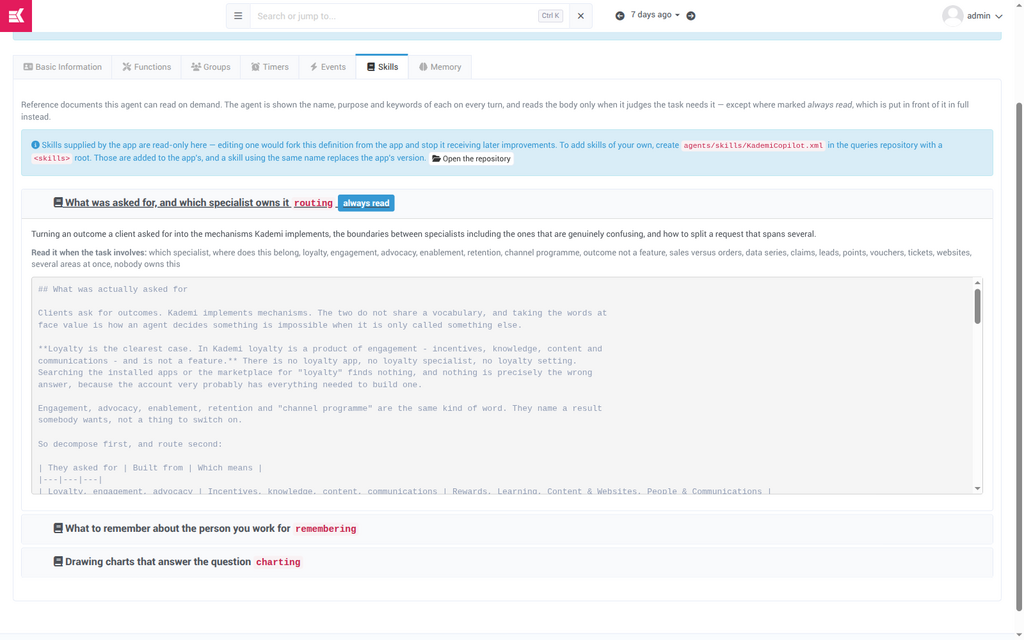
Fig 7: Skills — the Copilot carries three: routing (always read), remembering and charting. App-supplied skills are read-only here on purpose; editing one in a form would fork the definition silently.
An account adds its own skills by creating
agents/skills/
in the queries repository with a
root. Those are added to the app's, and a skill reusing an app skill's name replaces it.
Timers and Events — running without being asked
Covered in section 08, along with the run-tuning controls that live on an event handler.
Memory
Covered in section Memory.
Definitions vs agents
A definition is a template. An agent is one running instance of that template, owned by one person. This distinction carries the entire security model, so it is worth being explicit about in the documentation.
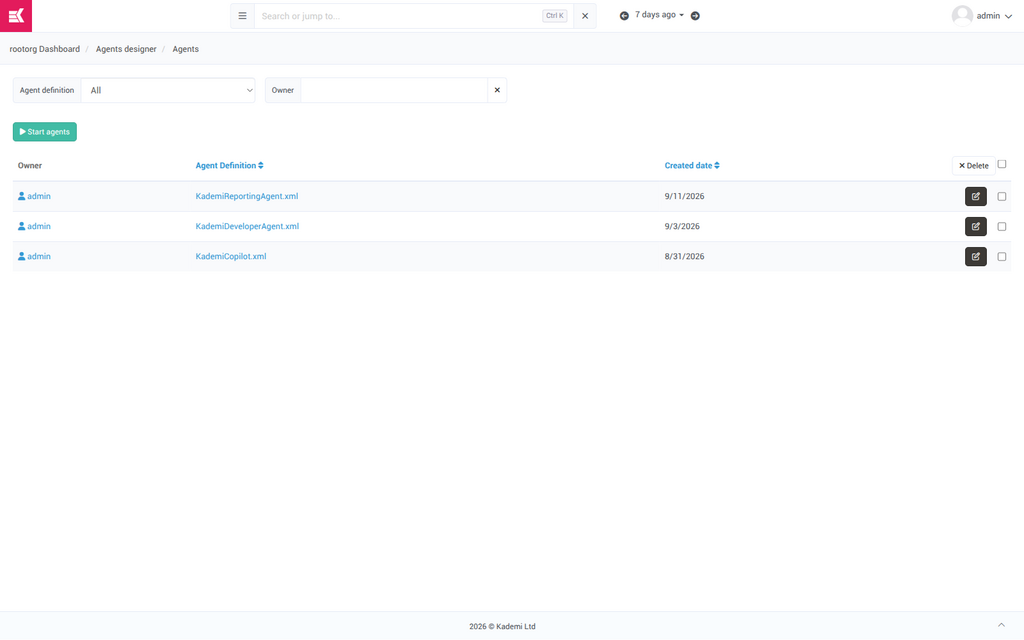
Fig 8: Agent Manager — every row is one person's agent. Filter by definition or by owner. Here one administrator has three: a Copilot, a Reporting agent and a Developer agent.
Agents are started from this page. Three modes:
- Yourself — one agent, owned by the current user.
- Agent Definition Groups — start one for every profile matching the groups on the definition. This is the bulk rollout.
- Specify Profile — pick one person and start an agent for them.
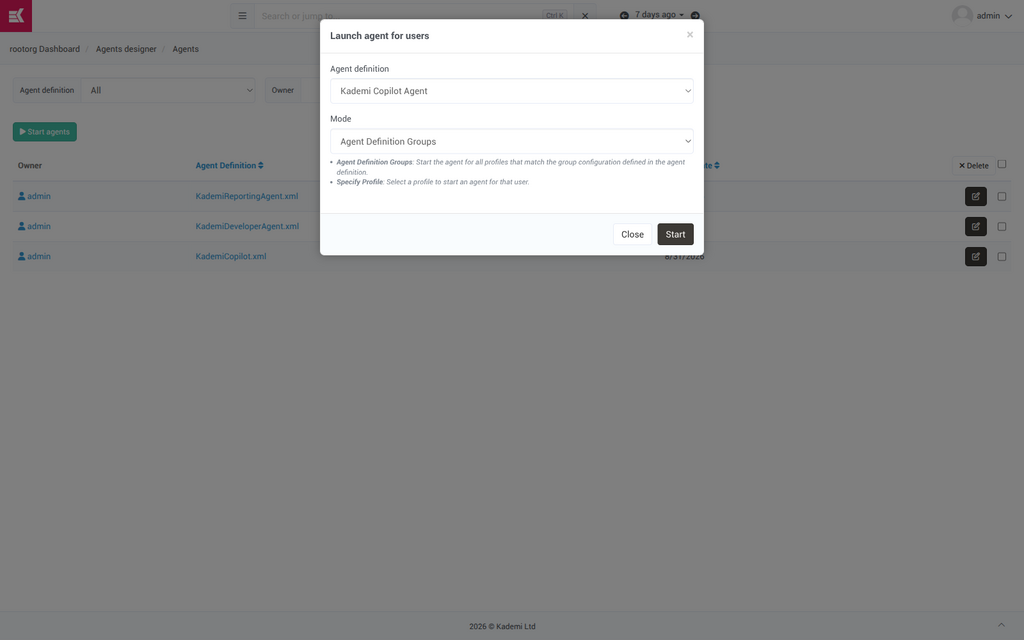
Fig 9: Launch agent for users. Each agent created here belongs to the person named, and acts as them.
Opening a single agent shows its timers with their next fire time, a way to test a timer immediately, and any workflows it is running.
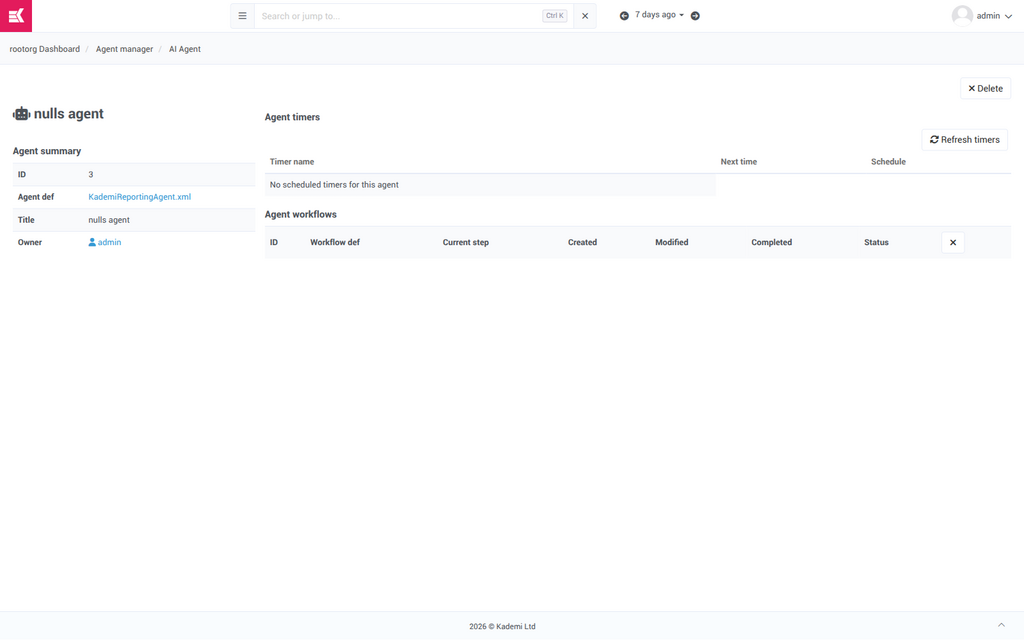
Fig 10: One agent. Refresh timers recalculates the schedule; a Test button beside each timer runs it now rather than waiting.
Four ways a run starts
Chat is the visible one, but three others run unattended, and they are where the framework earns its keep.
|
INTERACTIVE A person asksThe Copilot panel in the admin. Synchronous, with live progress, and budgeted for someone watching a spinner. |
SCHEDULED A timer firesAn interval, optionally pinned to a time of day, with instructions saying what to do. One timer fires once per agent, so a timer on a definition rolled out to fifty people is fifty runs. |
|
REACTIVE An event arrivesThe agent subscribes to a platform event by name — |
MULTI-STEP A workflow runsA longer procedure with steps and stored data, visible on the agent's own page while it is in progress. |
Timers
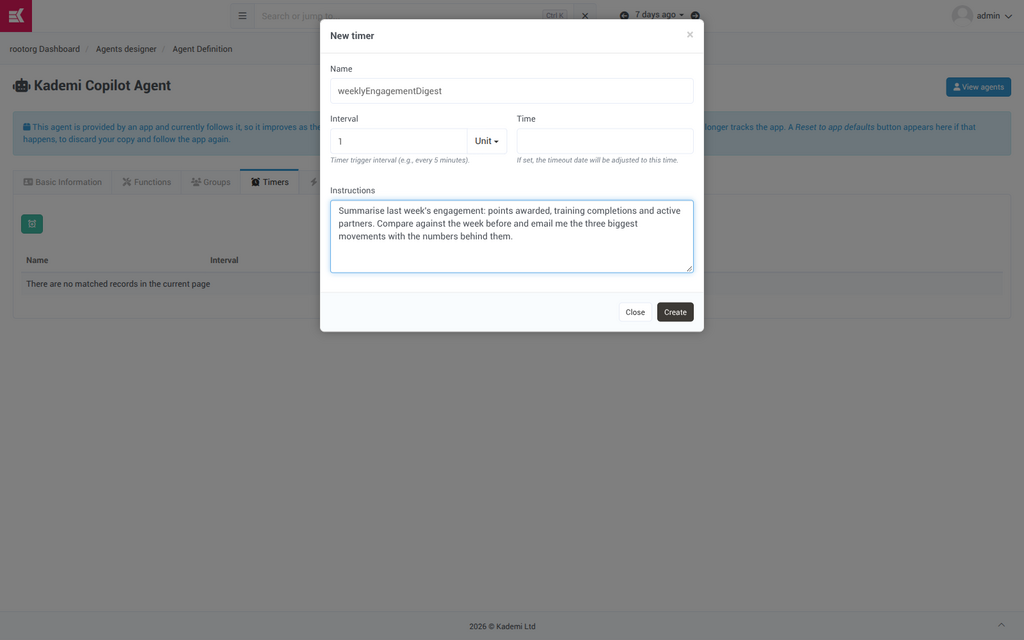
Fig 11: New timer. Interval plus unit sets the cadence; Time pins the run to a time of day. Instructions are the task.
Events, and the buffering that makes them affordable
Every run is an AI call, so binding an agent to a frequently-firing event naively would be a model call per event forever. Instead, matching events are collected, and the agent runs once over the batch when either threshold is reached — this many events, or this many seconds. One event is right for something rare and worth answering on its own; a larger batch for something frequent.
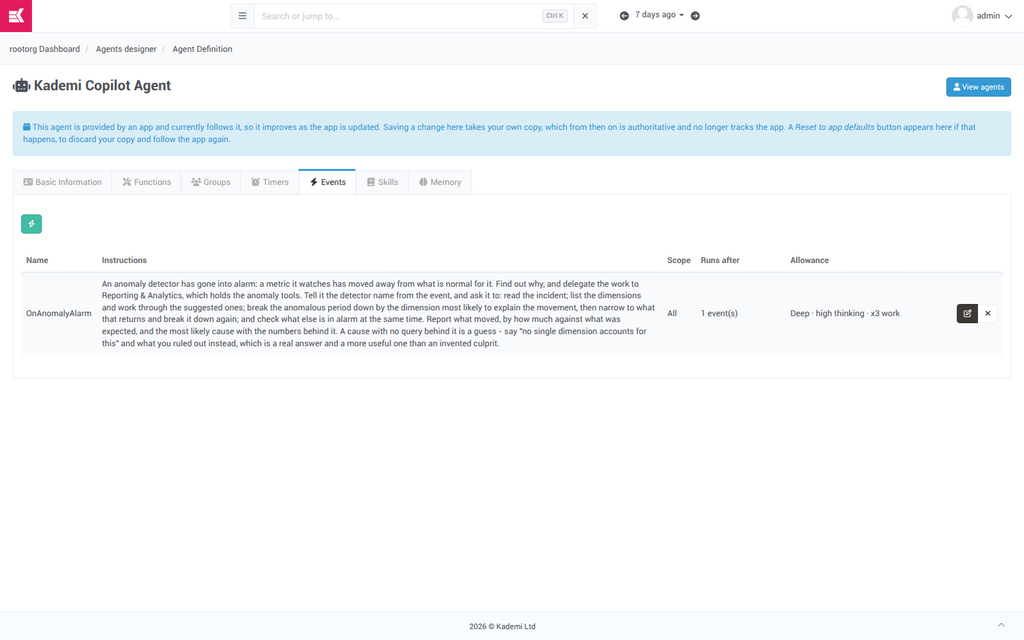
Fig 12: Events on the Copilot. The stock OnAnomalyAlarm handler investigates why a watched metric moved. Its allowance reads Deep · high thinking · x3 work — an investigation is not a chat answer.
An event handler is also where the run-tuning controls surface in the UI. Because nobody is waiting on an event-driven run, it can afford to think harder and dig further than a chat turn. All three settings reach the specialists the agent delegates to, not just the agent itself.
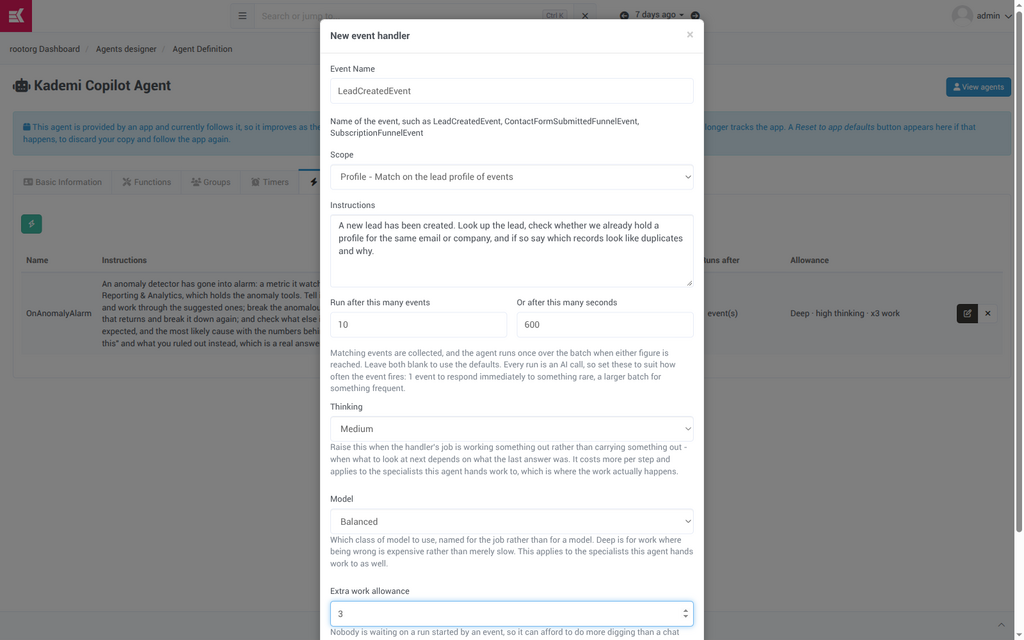
Fig 13: New event handler, filled out as an example. Thinking, Model and Extra work allowance are the three run-level overrides — each blank means "use whatever this agent normally uses".
An account can switch off a handler an app supplies. Because a disabled handler is no longer part of the definition, the Events tab lists it separately under Switched off with a Restore button — otherwise there would be no way back to the app's version.
The Copilot panel
The panel opens on the right of any admin page and is resizable. A conversation belongs to the agent it was started with, for its lifetime — you cannot move a conversation between agents.
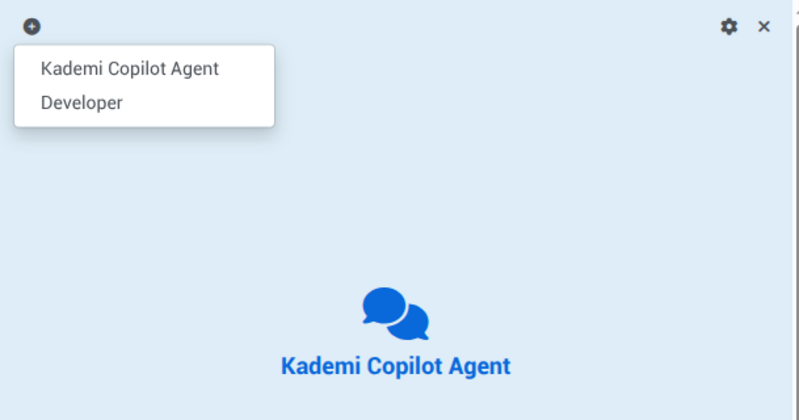
Fig 14: The + button starts a new conversation, and offers a choice of agent when the account has more than one to choose from.
With a single agent it behaves exactly as it always did.
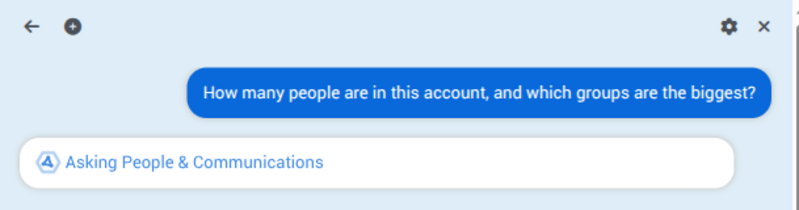
Fig 15: Delegation, made visible. The progress line names the specialist the root handed the task to, live, while it works.
This is the clearest illustration of the whole architecture and belongs early in any end-user documentation.
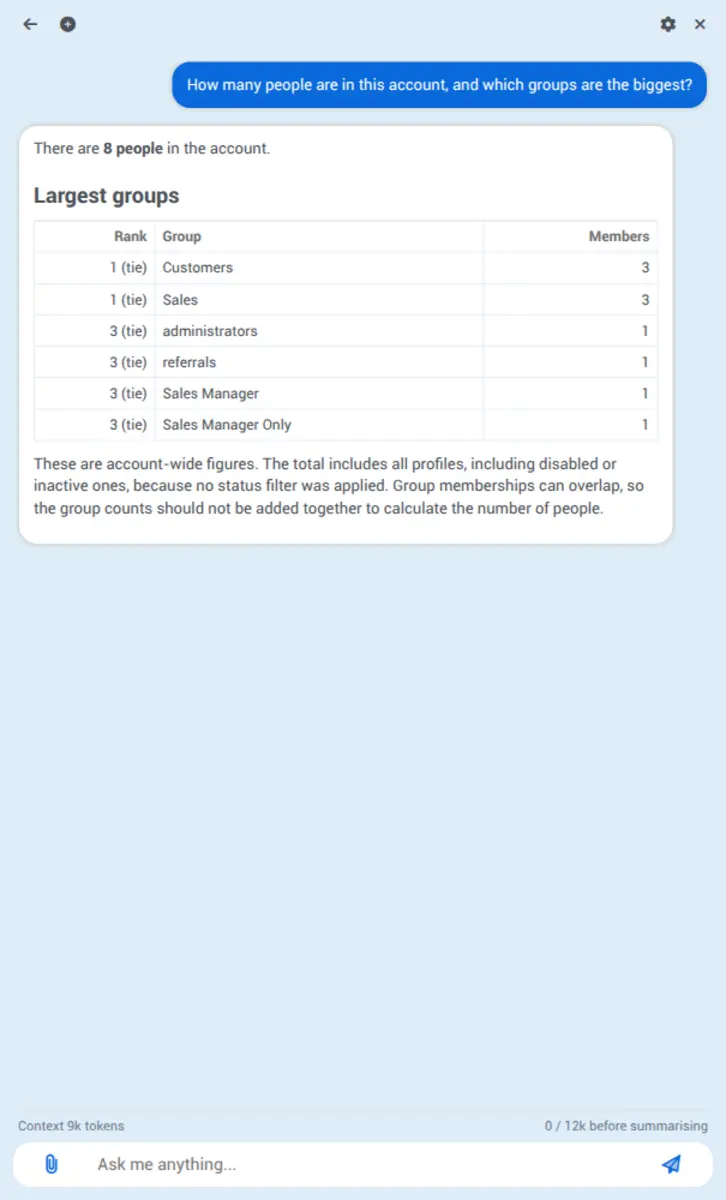
Fig 16: The answer. Note the footer: Context 9k tokens · 0 / 12k before summarising.
The context meter is only shown once a turn has reported a real number, and it is what tells a user whether to start a new conversation.
When a conversation grows past the threshold the meter names, it is compacted rather than truncated: the canonical history is append-only and untouched, and a marker lets the model-facing view be recomputed on demand. Conversations are titled automatically in the background a few seconds after they start.
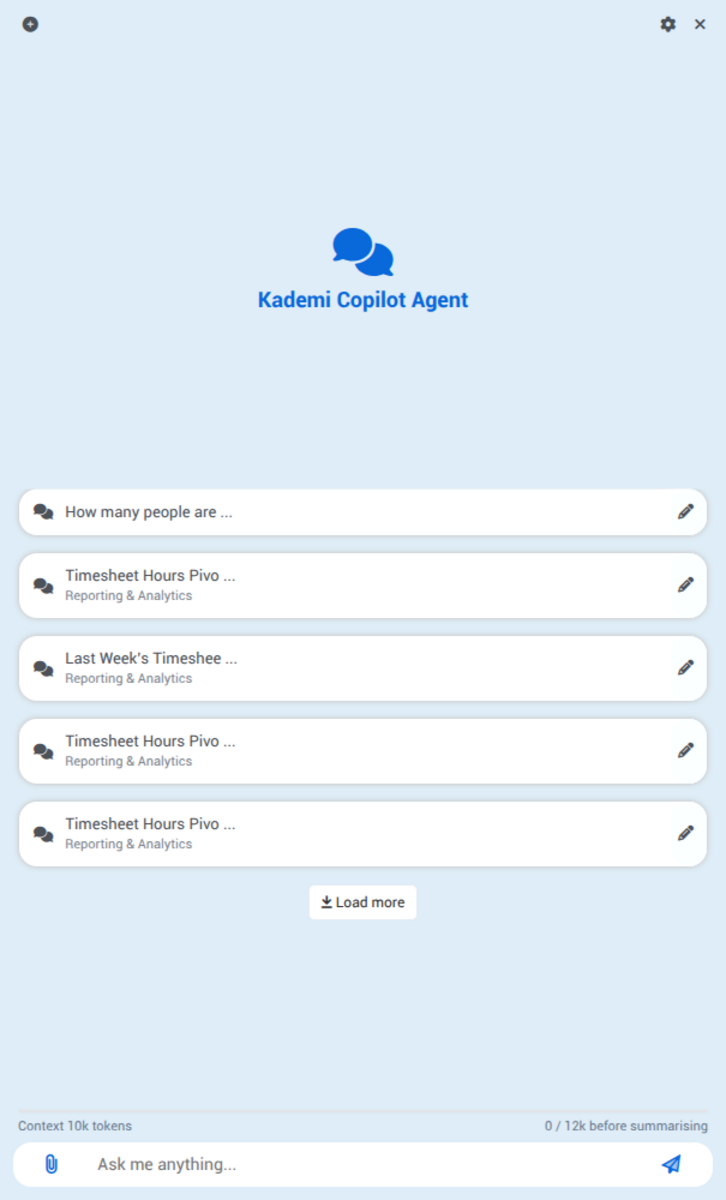
Fig 17: The conversation list labels each conversation with the agent it belongs to.
Conversations that existed before agent selection shipped are read as belonging to the Copilot, so nothing needed migrating.
The panel also accepts image and PDF attachments, and renders charts and generated documents inline.
Consent
An agent that can change things has to ask before it does, and the framework has a first-class mechanism for that. A tool marked as requiring consent stops the run, states plainly what is about to happen, and waits.
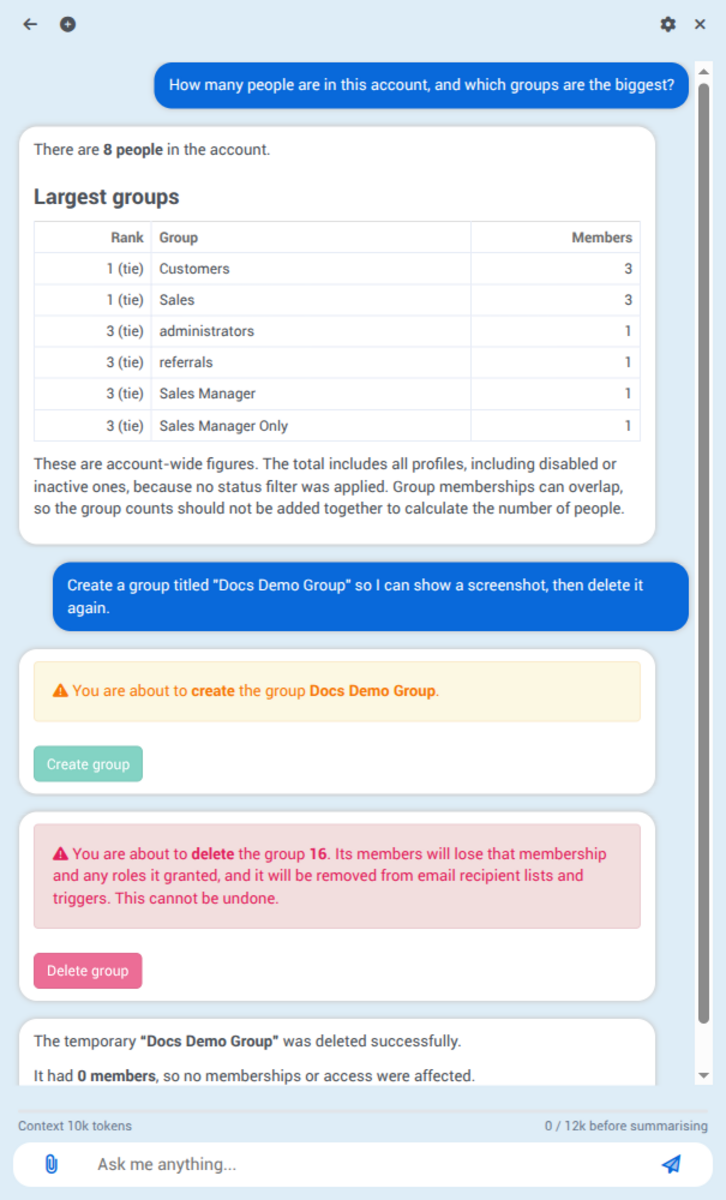
Fig 18: The consent flow end to end, captured live. A creation asks in amber; a deletion asks in red and states the impact
— members lose the membership and any roles it granted, it is removed from email recipient lists and triggers, and this cannot be undone.
Two properties are worth spelling out for readers:
- The prompt states consequences, not just the action. Destructive tools are written to say what the user is about to lose, and the framework renders them differently from ordinary confirmations.
- A pause can outlast the session. Because a run is a persisted object, a consent pause can span an asynchronous channel — an email or SMS reply that takes hours or days — and the run resumes where it stopped rather than starting again.
Consent is applied by judgement, not blanket policy. The Developer agent's writeRepoFile deliberately does not prompt, because a loop that asks on every file write is one nobody would use; deleteRepoFile and revertBranch do. Every write instead returns the hash the branch was on immediately before it, so the undo exists whether or not anyone thought ahead.
Memory
Agents remember the person they work for between conversations. What has been recorded is put in front of the agent at the start of each new conversation, so it does not ask the same question twice.
There are two kinds of memory, and the difference is about whose fact it is:
|
Something durable about this user or how they work — what a word means to them, which part of the account is theirs, how they want answers. Only that user is ever told it. Other administrators have their own. |
|
An account fact rememberAccountFact |
Something durable about the business — how a programme works, what something is for. Proposing one is open to any conversation; confirming one is a decision about everybody and happens on this tab. Until confirmed it reaches only the person who said it. |
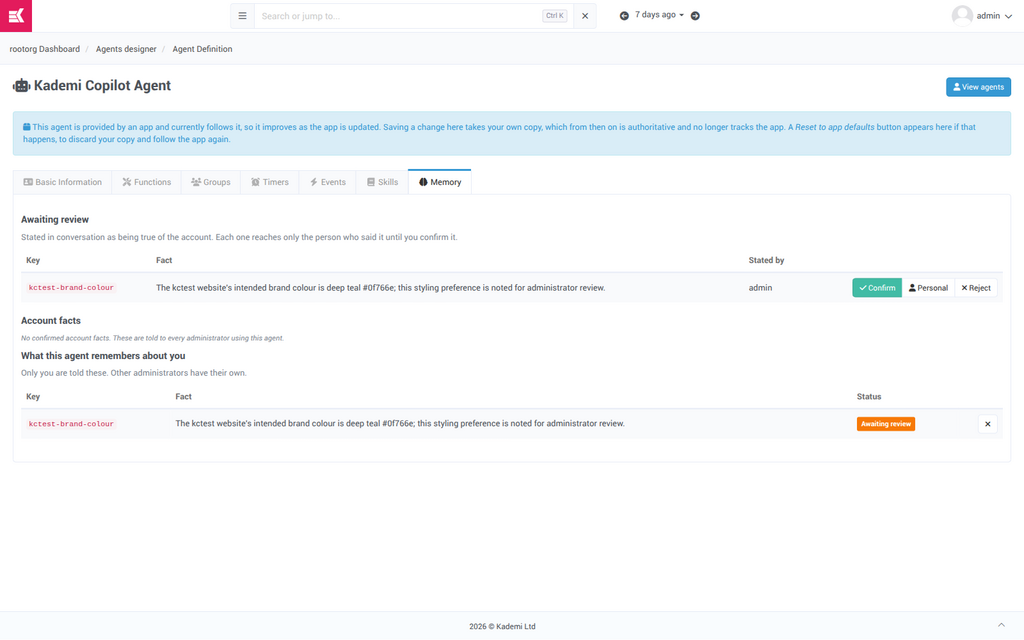
Fig 19: Memory — a real proposal awaiting review. An administrator can Confirm it for the whole account, downgrade it to Personal, or Reject it.
Below, the same user sees what the agent has recorded about them, and can delete any of it.
Remembering is the root agent's job alone. Specialists see one scoped task and none of the conversation, which is the worst position from which to judge what is durably true about a person — and every specialist writing into the same store would fill it with domain trivia.
Web access
Agents can read web pages, but only from hosts the account has explicitly allowed. The list starts empty, which means an account that has configured nothing has agents that cannot read any web page at all.
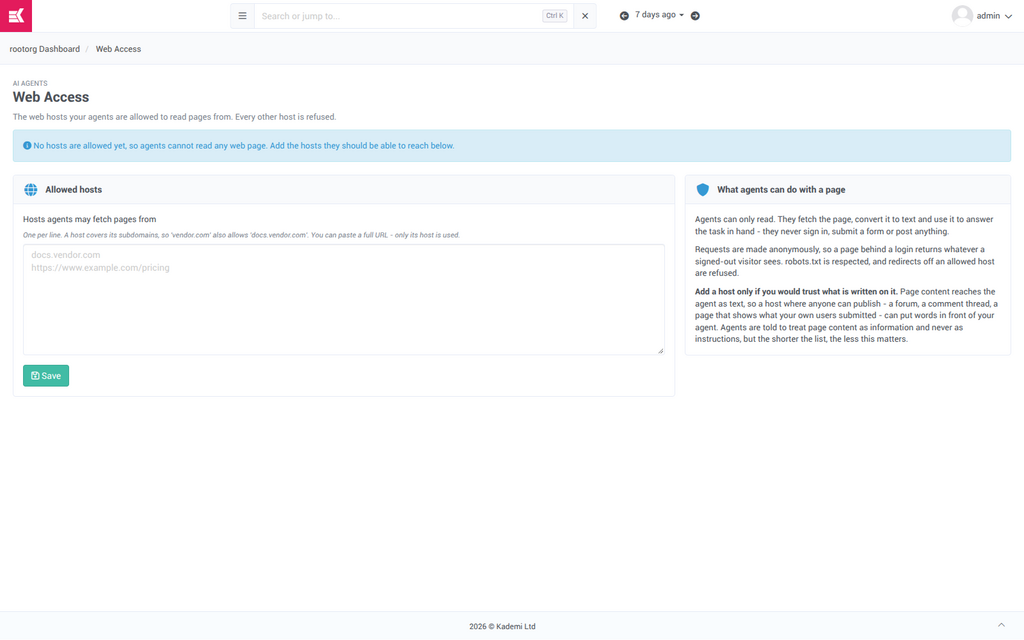
Fig 20: Web Access. One host per line; a host covers its subdomains, and a full URL may be pasted because only its host is used.
The constraints are worth restating verbatim in the documentation, because they answer the questions a security reviewer will ask:
- Agents can only read. They fetch the page, convert it to text, and use it. They never sign in, submit a form or post anything.
- Requests are anonymous, so a page behind a login returns whatever a signed-out visitor sees.
robots.txtis respected, and a redirect off an allowed host is refused.
Page content reaches the agent as text, so a host where anyone can publish — a forum, a comment thread, a page showing what your own users submitted — can put words in front of your agent. Agents are instructed to treat page content as information and never as instructions, but the shorter the list, the less that instruction has to carry. Add a host only if you would trust what is written on it.
The security model
One invariant carries everything, and it did not change in this release:
An agent always acts as its owner, and can only do what its owner could do. It is not a service account, it holds no privileges of its own, and delegating to a specialist does not widen what is possible — the specialist runs as the same person
Four mechanisms enforce it, and each answers a different question a reader will have:
-
- Function roles
Every function declares the roles it requires. A user without them is never offered the tool — and the check is repeated when the tool actually runs, not only when it is offered, so a model that invents a tool name gets nowher The agent's whitelist An agent can only call functions its definition lists. Holding the role is not enough if the agent was never given the tool. Group membership Decides who may launch an agent from a definition at all, and gates delegation: an agent may only hand work to a specialist whose groups include the owner. Consent For actions worth a human decision regardless of permission — see section 10.
Two boundaries are deliberately not drawn, and both are choices rather than gaps. There is no restriction confining the Developer agent's writes to a non-live branch, because most accounts develop directly on the live version and such a rule would only make the tools unusable — instead every write reports whether it was live and returns its own undo. And there is no new messaging-channel abstraction: Slack, email, SMS and web chat remain self-registering marketplace apps, which is what lets a channel own its own protocol.
Notes for the docs team
The four ideas a reader needs first
- A definition is a template; an agent is one person's instance of it. Nearly every other question resolves once this is clear.
- The Copilot delegates; it does not answer. The "Asking …" progress line (Fig 15) is the fastest way to teach this.
- Saving a change forks the agent from the app. Worth a callout wherever the Designer is documented.
- An agent is its owner. The answer to almost every "can it see / can it do" question.
Two things seen on screen that look like defects
Both were captured in these screenshots and should be checked against the current build before anything is published around them.
- The delete-group consent prompt (Fig 18) names the group by its id — "the group 16" — rather than its title, which undercuts the point of a prompt that exists to be read.
- An agent created with no title is displayed as "nulls agent" on the agent detail page (Fig 10).
Areas this briefing does not cover
- Agent workflows — the multi-step model referenced on the agent page. Only lightly exercised here.
- The Developer agent's write path in depth. It has its own surface area — repository writes, mandatory load-checks after every write, atomic revert — and probably deserves its own document aimed at client developers rather than administrators.
- MCP. The same tool library is reachable from external MCP clients through the
KMCPapp, which is how an agent outside Kademi can use these tools. Separate app, separate documentation. - Messaging channels. Slack, email and SMS as agent surfaces are unchanged by this release and are documented with their own apps.
Source material
The design document behind this work is feature-plans/AGENTIC_FRAMEWORK_UPGRADE_PLAN.md in the repository, and the build notes and QA testing notes on issue #24134 are the most reliable record of what each increment actually changed.