Building on Kademi with a coding agent
A coding agent such as Claude Code can build Kademi apps, components and website changes for you. This page sets one up for Kademi, then follows a real example from an empty folder to a working component on a live site.
What we provide
- The Kademi skills. Instructions that teach an agent how Kademi works: server-side JavaScript, templates, components, KSync and security. They install into your agent once and load by themselves when a task needs them. They are at github.com/Kademi/skills.
- Kademi's app source. github.com/Kademi/kademi-apps holds the source of our own Marketplace apps and libraries, kept up to date. Your agent searches it to see how Kademi's own apps solve a problem before it writes anything.
- KSync. Connects a folder on your computer to a repository on your account, so each file the agent saves goes up as it is saved. Developing with Ksync covers it in full.
What you need
- A coding agent. We recommend Claude Code in Visual Studio Code. The skills also work with Cursor, Codex, GitHub Copilot, Gemini CLI and many others.
- Node.js and git on your computer. The agent installs KSync, and Java if KSync needs it.
- Sign-in turned on for your account. The KOAuth2 app installed, with dynamic client registrations allowed. See Before you start in Developing with Ksync.
- A site or app version you can safely change. KSync sends every saved file to the account straight away, so work on a test site or a version that is not live.
Set up your workspace
Make an empty folder, open it in Visual Studio Code, start your agent and paste this, with the address changed to the site or app you want to work on:
Set up a Kademi workspace in this folder by following https://raw.githubusercontent.com/Kademi/skills/main/SETUP.md - I want to work on https://youraccount.admin.kademi.us/repositories/yoursite/version1/The address is your admin site, then /repositories/, then the repository and version. For a website, the admin console shows /websites/ in that place: change it to /repositories/. Name as many sites and apps as you like.

The agent installs the Kademi skills and KSync if they are missing, downloads Kademi's app source, and checks out each site or app you named. Signing in opens your browser for you to approve. If no browser opens, the agent gives you the address to paste in yourself.
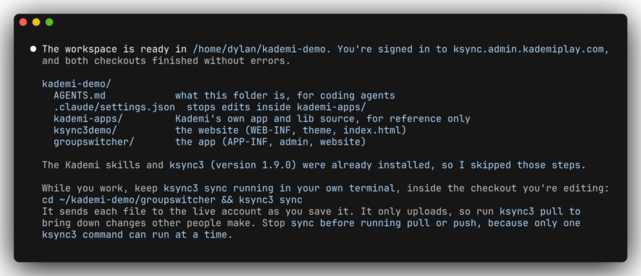
When it finishes, the folder looks like this:
your-folder/
  AGENTS.md        tells any agent what this folder is
  kademi-apps/     Kademi's app source, for the agent to read
  yoursite/        a KSync checkout of your site
  yourapp/         one folder per site or app you named
If the agent installed the skills just now, start a new session so it picks them up.
Prefer to set it up by hand, or with your own folder layout? SETUP.md lists every step the agent follows.
While you work
Open a second terminal in the checkout you are working on and leave ksync3 sync running. It sends each file to the account as the agent saves it. The agent does not start it for you, because it never finishes.
cd yourapp
ksync3 sync
Example: a newsletter picker
A component a site editor can put on any page: a select box where a signed-in member picks the weekly or the monthly newsletter, and Save moves them into that group.
1. Create the app and the groups
In the admin console, go to Manage applications, open the App Builder tab and click Create new app. Give it a simple name, tick App Provider and create it.
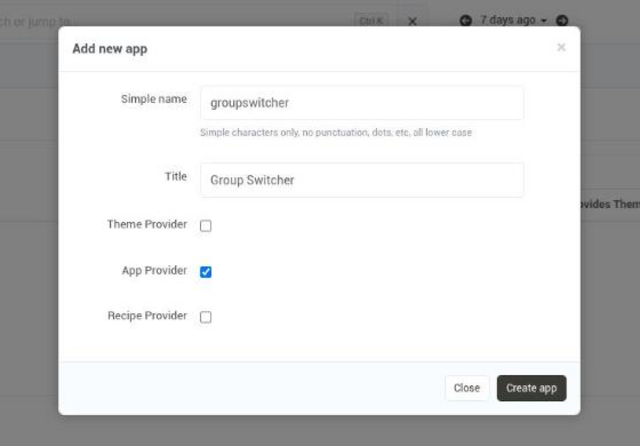
Then under Groups, add two groups of the user tag, or opt-in kind: Weekly newsletter and Monthly newsletter. Their codes, weekly-newsletter and monthly-newsletter, are filled in for you.
If your workspace is already set up, ask the agent to check the new app out into it, giving its /repositories/ address.
2. Ask for the component
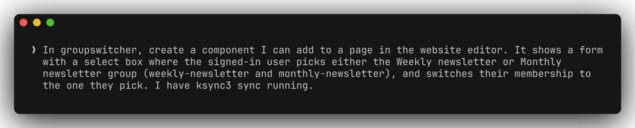
Describe it the way you would brief a developer: what it does, who uses it, and the exact names of anything it depends on. This took a little over two minutes. The agent ends by saying what it built, which files it changed, and what it has not tested yet.
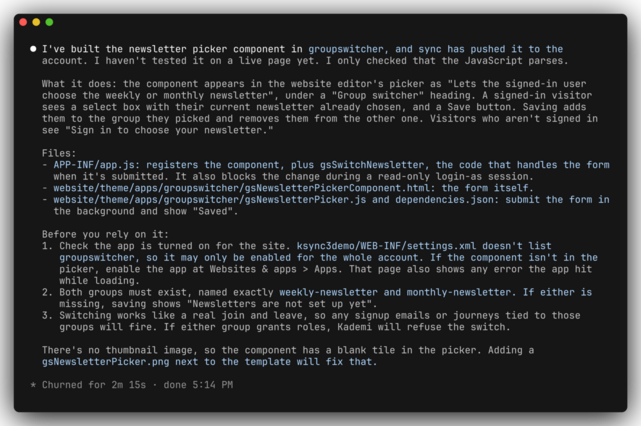
3. Turn the app on
A new app starts switched off. Turn Group Switcher on in Manage applications, then on the Apps tab of the website.
4. Put it on a page
Add it to a page in the website editor, or ask the agent to.
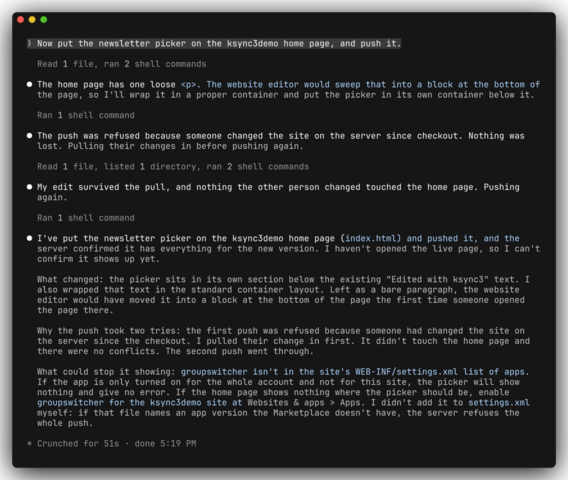
The first push was refused because the site had changed on the server since the checkout. Turning the app on in step 3 did that. The agent pulled the change in and pushed again, which is what you would do yourself.
5. When it does not work first time
The first version showed an error when saving. Tell the agent what you see, in your own words: what you clicked, what you expected, and any message on the screen. Here it took two rounds. The first guess was wrong. With the second report the agent found the real cause, fixed it, and checked both switches.
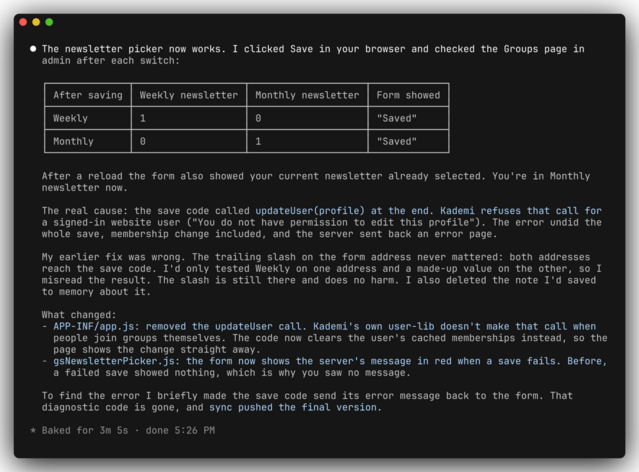
An agent with a browser tool can test the page itself. Without one, you click and tell it what happened.

Tips
- Read the summary. The agent says what it changed and what it has not tested. Do the checks it lists.
- Use a test site. Every saved file goes to the account as soon as it is saved.
- Give exact names. Group codes, page paths and repository names save the agent guessing.
- One KSync command at a time. Stop
ksync3 syncbefore asking the agent to pull or push. - Refresh Kademi's source now and then with
git pullinsidekademi-apps.
Every picture on this page is real: a Claude Code session building this example on a demo account.